Skip to content

Your event, live.

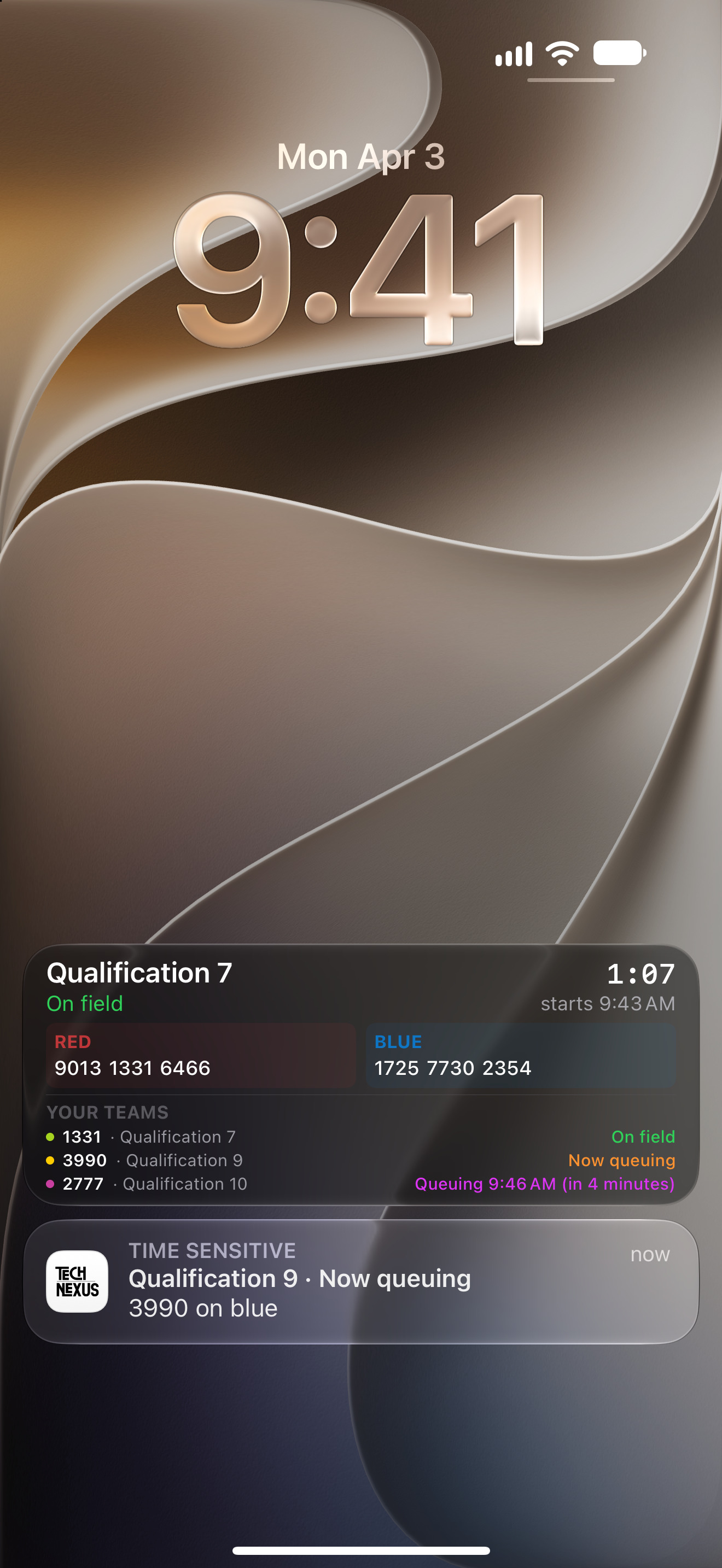
A companion app for FIRST® Robotics Competition teams: the schedule as it queues, on your Lock Screen, with an alert when it's your turn.

Android soon · Take the tour

  1. What it is

    TechNexus is a companion app for FRC events. It reads your event from frc.nexus and puts it where you'll see it: every match as it's called to queue, on your Lock Screen, with a nudge when it's your team's turn.

  2. 01 / 06Live Activity

    On your Lock Screen.

    Your team's next match and when to queue for it, on the Lock Screen, in the Dynamic Island and on your Apple Watch, kept up to date even when the app is closed.

  3. 02 / 06Alerts

    A nudge when it's your turn.

    A notification when your match is called to queue or goes on the field, when lunch or alliance selection starts, and when the event posts an announcement. Pick the ones you want.
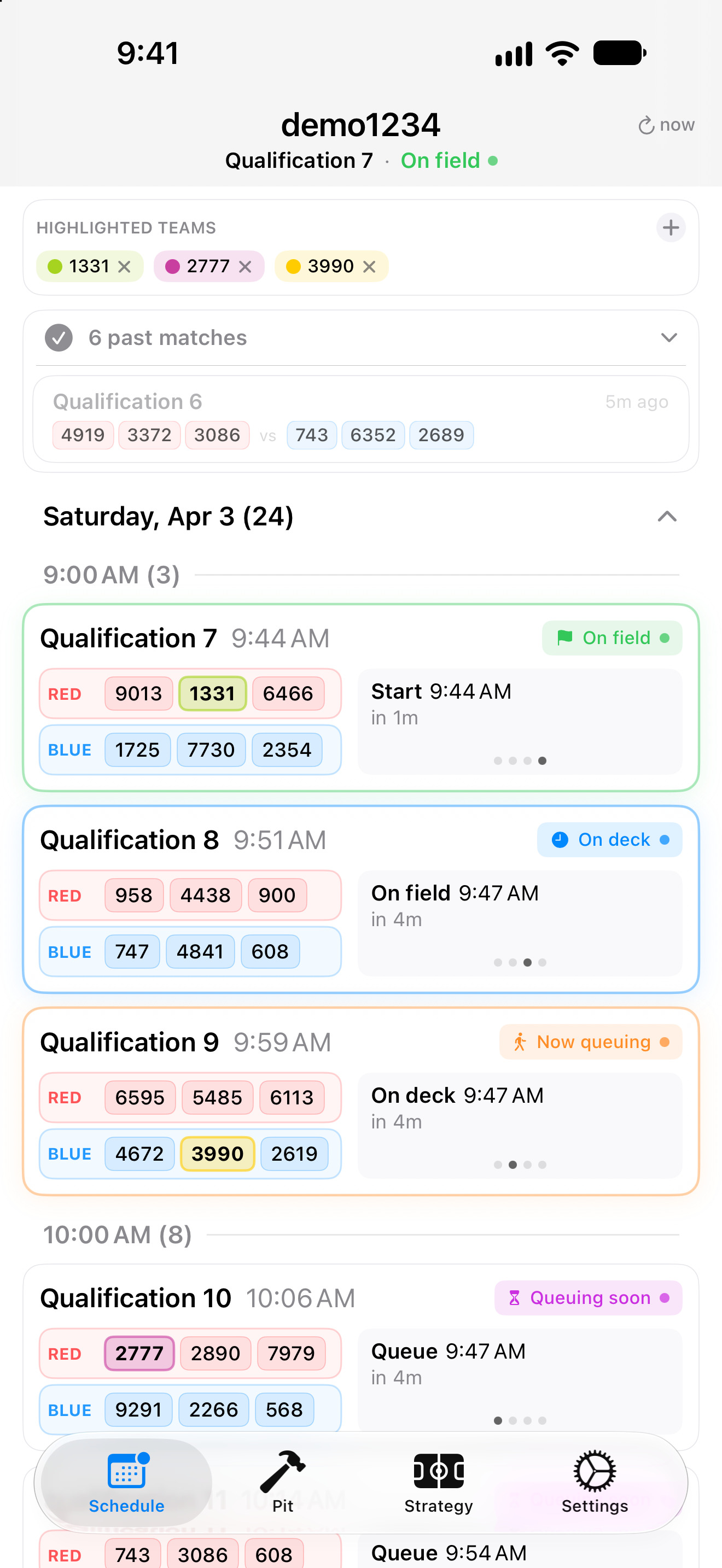
  4. The Schedule tab, each match with its status

    03 / 06The schedule

    Every match, as it queues.

    Your event's schedule with each match's status from frc.nexus: Queuing soon, Now queuing, On deck and On field. You can also track individual teams to stay ahead of your scouting.
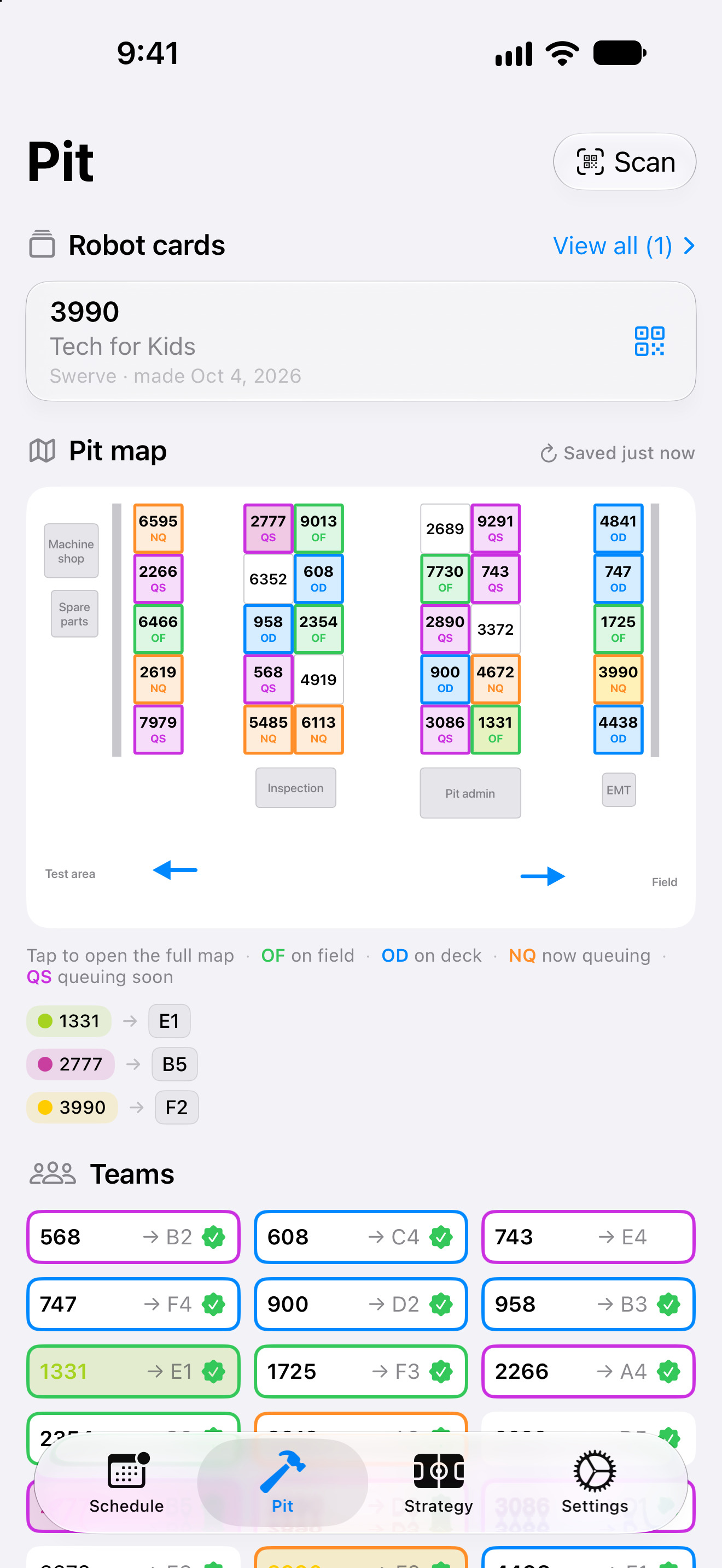
  5. The Pit tab: robot cards, the pit map and the team list

    04 / 06The pit map

    Find any pit.

    The event's pit map and full team list with their queuing status. All in your hands.
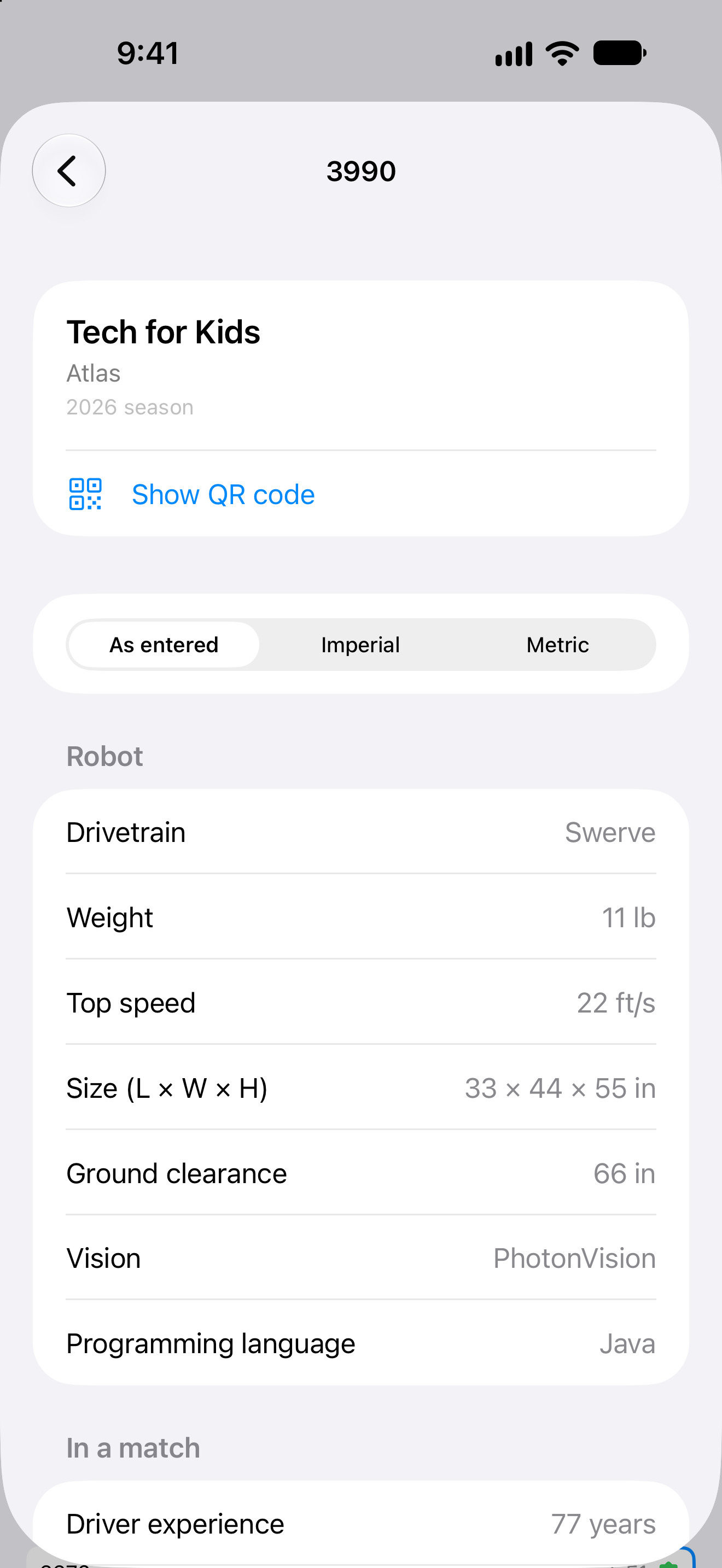
  6. Adding a robot card by hand: team, drivetrain, weight, top speed, vision and programming language

    05 / 06Robot cards

    Trade robots by QR code.

    Your robot on a card: drivetrain, size, weight and what it does. Another team scans it from your phone. For a team without the app, make its card by hand. No more conflicting pit scouting data.
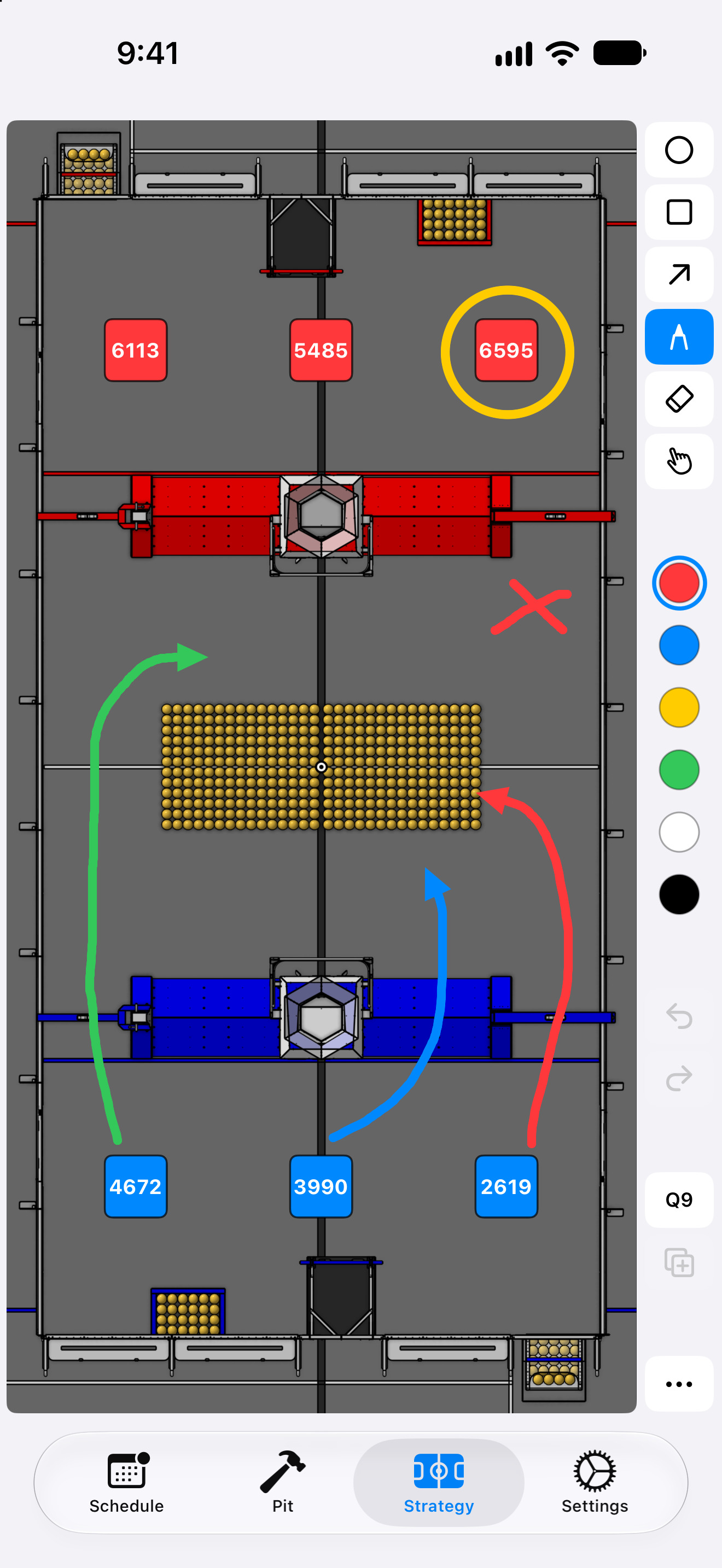
  7. The Strategy tab: the field with a match's six robots and a plan drawn on it

    06 / 06Strategy

    Plan the match, in the queue.

    A field to draw on with your alliance before a match. Choose the match, and its six robots appear on the field. Then sketch your game plan with the pen, arrows and shapes, and move stuff around as you wish. On iPad, draw with Apple Pencil, and double-tap or squeeze it to switch tools.

At a glance

Built for the pit, and every screen in it.

iPhone and iPad
On the App Store
iOS 16.2 or later
Apple Watch
On your wrist
Your Live Activity in the Smart Stack, with iOS 18 and watchOS 11 or later
Android
On its way
All four tabs and alerts are built; it isn't on Google Play yet
Windows
x64 and ARM64
Installers on GitHub, in jerryxfu/technexus-releases
One core
Shared by all three apps
All three read your event with the same code, so they agree to the minute
Price
Free
No account, and no ads
Data
Live from frc.nexus
Checked every 15 seconds while the schedule is open
Statuses
Four
Queuing soon, Now queuing, On deck and On field, each in the app's own colour
Offline
Always ready
The last schedule, pit map, team list, robot cards and strategy board stay on your phone

Made by

Jerry, Raphaël & Samy

Of FIRST Robotics Competition team 3990. An independent app, built on the data frc.nexus's queuers post, match by match.

The 3D phone is iPhone 18 Pro Max – High Quality 3D Model by Pro Animator, under CC BY 4.0, recoloured black, lightened for the web and with the app's screenshots on its screen.

Questions

Before you ask.

Does my event work with TechNexus?

If it runs on frc.nexus, yes: TechNexus shows what your event's queuing team posts there, as they post it. Choose your event in Settings, from every current and upcoming event on frc.nexus.

Is it free?

Yes. No account, and no ads.

Do I need an account?

No. Choose your event, add the teams you follow, and you're set.

What does it collect?

Only what keeps your Lock Screen and alerts current. The privacy policy says exactly what the app sends, what our server keeps, and for how long.

Which devices does it run on?

iPhone and iPad, with iOS 16.2 or later. Your Live Activity also shows on Apple Watch, in the Smart Stack, with iOS 18 and watchOS 11 or later. Windows PCs, x64 and ARM64, get the Schedule, Pit and Strategy tabs, without the Live Activity, alerts or scanning: the installers are on GitHub. Android is on its way.

What if the Wi-Fi gives out?

The last schedule, pit map, team list, robot cards and strategy board are saved on your phone, so they keep working, and the schedule says how old its data is.

Where do I get help?

The support page answers the usual questions, and says how to reach us.

Ready when you are

Your event, live.

Free, for iPhone, iPad and Windows, with your match on Apple Watch too. Android is on its way.